
Ultimate Guide to AI Generated Images: Best Generators, Prompts & Uses (2026)
Generative artificial intelligence has permanently transformed how we conceive, produce, and share artwork and digital media across every media channel. AI generated images have evolved from curious pixelated experiments into photorealistic, production-ready visual assets relied upon by graphic designers, digital marketers, and creative artists worldwide.
Whether you need compelling marketing graphics, custom blog content, unique artwork, or realistic product conceptualizations, generative vision models make picture creation instant and accessible. In this guide, we will break down the inner workings of synthetic imagery, top generation models, prompt creation techniques, and practical ways to make stunning visuals without expert technical knowledge.
Detailed Profile: The Evolution of Visual AI Technology
To appreciate where synthetic media stands today, it helps to review how AI artwork creation developed from early research algorithms into the real-time, highly polished picture models used everywhere today.
| Attribute / Epoch | Early GAN Era (2014–2020) | Early Diffusion Models (2021–2023) | Modern Multimodal Models (2024–Present) |
| Primary Technology | Generative Adversarial Networks (GANs) | Latent Diffusion Models & Transformer Encoders | Multimodal Diffusion Transformers & Integrated Neural Networks |
| Typical Image Resolution | Low to Medium (256256 up to 512512) | Standard (512512 up to 10241024) | Ultra-High (2K, 4K, and scalable vectors) |
| Text & Lettering Handling | Unreadable abstract artifacts | Inconsistent spelling, mangled text | High precision, multi-language typography & layout control |
| Prompt Comprehension | Short single-word tags or simple phrases | Descriptive prompts with weighted style tags | Complex multi-scene natural conversational language |
| Key Benchmark Examples | BigGAN, StyleGAN | Stable Diffusion 1.5, Early Midjourney, DALL-E 2 | Midjourney V7, Flux Pro, Ideogram, GPT Image models |
| Primary Practical Application | Academic research, face swap proofs-of-concept | Social graphics, early concept art, hobbyist imagery | Commercial ad campaigns, packaging, UI design, vector graphics |
What Are AI Generated Images and How Do They Work?
At its core, an AI generated image is a visual asset created by an artificial intelligence model trained on vast collections of visual data. Rather than retrieving existing photographs or stitching stock photos together, these advanced machine learning systems build new graphics pixel by pixel based on your text descriptions or reference visual inputs.
Modern visual models primarily use diffusion architecture. During initial training, a neural network learns by taking millions of images, adding random static noise to them, and studying how to reverse that process to restore the original picture. When you enter a written prompt, the algorithm starts with a blank canvas of pure visual noise and systematically denoises it, guided by your textual context, until a crisp, original image emerges.
Why Synthetic Image Generation Is Changing Digital Content
Creating custom visuals used to require expensive photoshoots, specialized studio lighting setups, or advanced graphic editing mastery. While human creativity remains irreplaceable, ai generated images give everyone the power to translate imaginative concepts into clear visual media within seconds.
First, synthetic image generation cuts visual asset production time from days to mere moments. Marketers can quickly iterate through ad creative variations, A/B test distinct visual hooks, and build social media assets on the fly. Second, it opens up unlimited stylistic freedom. You can easily request a watercolor illustration, a 3D renders, or a realistic cinematic scene without buying separate software brushes or setting up physical lighting environments.
Pro Insight: The biggest advantage of synthetic visual tools is rapid ideation. Use them to test visual storytelling ideas fast before committing budget to full-scale commercial photography shoots.
Exploring top Tools for Generating Custom Artwork
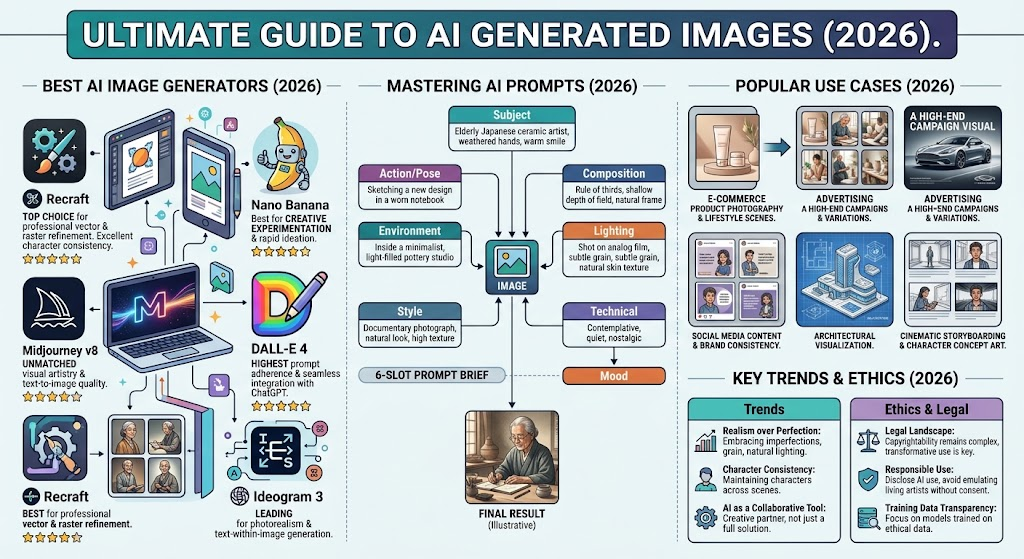
Choosing the right image generator depends heavily on your creative goals, budget, and desired visual output style. The market offers various specialized platforms, each with distinct strengths:
- Midjourney: Universally praised for rich, cinematic artwork and default aesthetic quality. It excels at imaginative concept designs, fantasy environments, and artistic portraits.
- Flux Models: Renowned for realistic light interactions, accurate skin textures, and crisp photorealism across diverse portrait and product compositions.
- Ideogram: The leading choice when rendering readable typography, product labeling, and vector poster art is essential.
- Recraft: Tailored specifically for graphic designers and brand managers who need clean vector graphics, scalable SVG downloads, and consistent brand palettes.
- ChatGPT & GPT Image: Best for conversational, multi-turn visual editing where you want to tweak existing generated scenes with plain instruction updates.
How to Write Prompts for High-Quality Visual Output
The visual standard of your generated assets depends directly on how clearly you communicate with the model. Writing an effective text prompt requires balanced detail without overwhelming the AI system with contradictory instructions.
A dependable prompt structure includes five key components:
- Subject: State clearly what main item, person, or scene you want centered in the shot.
- Environment & Setting: Define where the action occurs, such as a moody alpine forest, a sunlit modern kitchen, or a retro-futuristic city street.
- Lighting & Atmosphere: Specify the light source and mood, like golden-hour sunlight, cinematic neon glows, soft diffused studio lamps, or misty atmospheric fog.
- Style & Medium: Indicate the medium, such as 35mm film photograph, minimal vector icon, oil painting on textured canvas, or sleek 3D architectural render.
- Framing & Camera Angle: Guide the shot perspective, using terms like wide landscape angle, macro close-up detail shot, eye-level portrait, or bird’s-eye view.
Photorealism Secrets: Making Visuals Look Natural
Early synthetic media often looked overly smooth, symmetrical, or artificial. Today’s trend prioritizes organic authenticity over clinical perfection. Audiences favor images that mirror genuine life over plastic-looking renderings.
To achieve natural visual results with ai generated images, steer clear of buzzwords like “hyperrealistic” or “hyper-detailed,” which can accidentally introduce unwanted plastic textures or harsh digital sharpness. Instead, incorporate realistic camera details into your text prompts, such as “slight film grain,” “natural skin pores,” “subtle lens flare,” or “candid daylight shot”. Adding slight real-world imperfections—like soft focus, organic asymmetrical features, or gentle shadows—makes generated pictures feel grounded and believable.
Enhancing Marketing Graphics with Synthetic Visual Assets
Modern digital marketing relies heavily on eye-catching visual presentation. Visual AI platforms enable marketing teams to produce high-impact assets without running up massive production budgets.
E-commerce businesses routinely leverage visual generation models to showcase products in varied lifestyle environments without moving physical items to studio sets. Content creators draft custom blog header banners, engaging social media graphics, and YouTube video thumbnails that grab audience attention right away. By adopting iterative, AI-assisted workflows, small marketing teams can maintain a fresh visual presence across all online channels.
Typography and Text Accuracy inside AI Visuals
For years, rendering crisp, readable lettering inside generated art was a major weakness of diffusion models. Models frequently returned scrambled glyphs or misspelled lettering.
Recent visual models have conquered this hurdle. Specialized typography systems can now render accurate titles, short promotional slogans, clean product labeling, and clear signboards inside visual scenes. When creating graphic assets like event posters, book covers, or social media announcements, put short target phrases in quotation marks inside your prompt to give the tool clear visual targets.
Ethical Practices and Watermarking Standards
As synthetic artwork becomes harder to distinguish from traditional photography, visual authenticity and fair creator attribution have become paramount. Responsible creative production requires clear visual labeling and ethical sourcing guidelines.
Major technical platforms are increasingly building open provenance standards—such as C2PA metadata tags and invisible digital watermarks—directly into generated output. These built-in credentials let viewers check where a picture originated and confirm whether AI tools helped create it. Adding visible disclosures or maintaining transparent asset records protects consumer trust while building a reliable, ethical creative brand.
Raw Visual Concept ──► Prompt Engineering ──► AI Model Generation ──► Precise Inpainting / Editing ──► Final Asset Deployment
Combining Human Creativity with Artificial Intelligence
The most rewarding approach to synthetic media treats visual AI as a powerful creative partner rather than a complete replacement for human artistic taste. Technology builds initial visual foundations fast, but human taste directs the ultimate message.
Professional graphic artists use ai generated images to draft fast storyboards, gather visual inspiration, or generate unique texture overlays. They then refine those assets inside digital editing suites—adjusting color curves, combining layers, correcting composition errors, and adding distinct brand styling. This collaborative process gives you the best of both worlds: unprecedented production speed anchored by authentic human direction.
The Road Ahead: Emerging Visual AI Trends
The landscape of visual media generation continues to evolve at a breakneck pace. Key advancements are reshaping how we interact with and edit digital imagery:
- Direct Natural-Language Editing: Instead of starting completely over, users can edit specific visual elements using plain conversational commands, like altering background scenery or adjusting scene lighting.
- Character & Asset Consistency: Advanced reference systems allow creators to keep characters, products, and visual themes identical across entire visual series.
- Instant Image-to-Video Transformation: Still synthetic pictures can now be seamlessly animated into dynamic video clips for social media channels and short-form video feeds.
- Seamless Vector Exporting: Generators produce clean SVG vector files alongside standard raster images, making logo design and illustration workflows far easier.
Summary and Next Steps
Synthetic image creation has evolved from a novel technical experiment into a core creative asset for designers, business owners, and digital content creators. By mastering clear text prompts, picking specialized generation platforms, and combining automated speed with thoughtful human oversight, you can produce stunning visual content whenever inspiration strikes.
Are you ready to bring your imaginative visual ideas to life? Pick your favorite generator tool, practice crafting descriptive prompts with clear camera angles and realistic lighting, and start creating original visual content today!
Frequently Asked Questions (FAQs)
What are AI generated images?
They are completely original digital visuals, illustrations, or graphics produced by machine learning models that analyze written prompt instructions and build picture outputs from structured noise.
Are AI generated images free to use for commercial projects?
Usage rights depend on the specific platform you choose and your subscription tier. Many platforms grant full commercial rights on paid plans, but always double-check your tool’s terms of service before using visual assets commercially.
How can I make my generated visuals look more realistic?
Incorporate natural photography details into your written prompts, like camera lens parameters, soft natural lighting, subtle film grain, and organic skin textures.
Which tool is best for creating readable text inside pictures?
Platforms like Ideogram and Recraft lead the industry in text rendering and typography, making them ideal for designing posters, product packaging, and social media banners containing clear words.
Can I edit a specific section of a generated image without starting over?
Yes! Many top generation platforms offer built-in “inpainting” features or natural-language editing capabilities. You can highlight a specific region and enter clear instructions to update that area while preserving the rest of your scene.
Do I need strong technical skills or coding knowledge to generate AI artwork?
Not at all! Modern visual generators are designed to be accessible and user-friendly. If you can write a descriptive sentence explaining what you want to see, you can start creating visual assets immediately.